Infrastructure choices
Well, starting with our infrastructure choices, we had a few goals in mind:
- Scalability: We wanted to handle a large number of teams without performance issues.
- Reliability: We needed the infrastructure to be stable. If something went down, we’d have 80 people staring at us in person.
- Security: We were running a CTF. Some players would absolutely poke at our infrastructure for fun. The competition infra couldn’t be the easiest target.
- Ease of Use: We wanted the infrastructure to be manageable for us and smooth for participants.
- Dynamic Instances: Some challenges need per-team isolated environments, so we needed a way to spin those up on demand.
With these goals and a limited timeframe (not all challenges were ready when we had to lock in infrastructure decisions), here’s what we landed on.
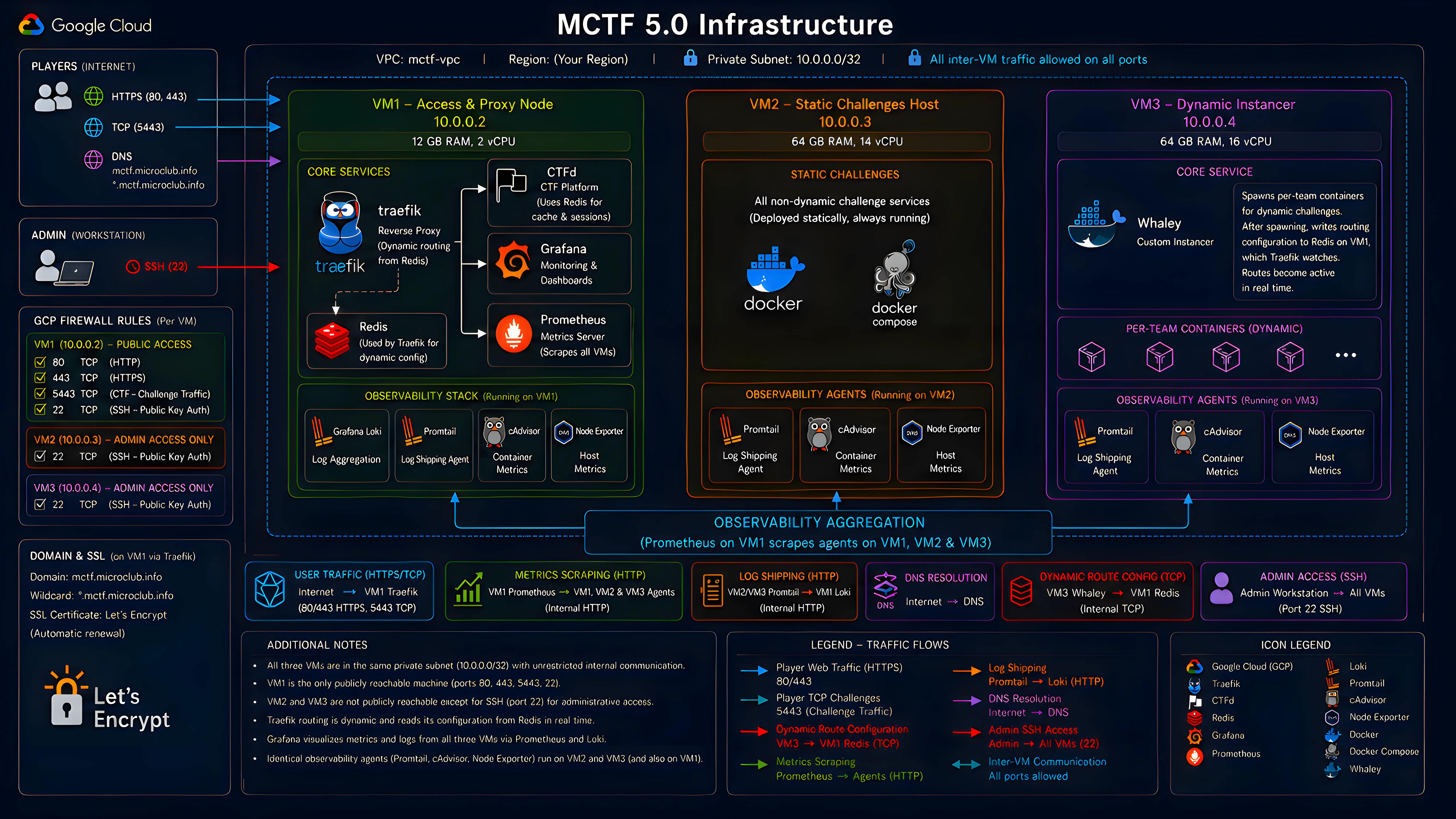
We ran everything on Google Cloud Platform with three VMs inside a single private subnet. Internal communication between the VMs is wide open on every port; external access is locked down per-VM through individual GCP firewall rules. Only VM1 is publicly reachable.
VM1: The entry point (12 GB RAM, 2 vCPU). Hosts Traefik as our reverse proxy, CTFd for the competition platform backed by its own Redis instance, and our full observability stack (Grafana, Prometheus, and Loki) aggregating metrics and logs from all three VMs into a single dashboard. Traefik’s routing table is dynamic: it reads configuration from Redis at runtime, so new routes get picked up live without restarts.
VM2: Static challenges (64 GB RAM, 14 vCPU). Hosts all challenges that don’t need per-team isolation. No public exposure beyond SSH.
VM3: Dynamic instancer (64 GB RAM, 16 vCPU). Runs our custom instancer (more on that in a second). No public exposure beyond SSH.
All three VMs run Promtail, cAdvisor, and Node Exporter as background agents, shipping logs and metrics back to VM1.
For containerization we stuck with Docker and docker-compose. Kubernetes would’ve been the right call at scale, but every challenge author was already using compose, and our instancer was built around it. Staying consistent beat adding an orchestration migration to our pre-event crunch.
The public domains mctf.microclub.info and *.mctf.microclub.info both point to VM1, with Traefik handling SSL termination using Let’s Encrypt certificates. This setup allows us to route traffic securely to both the CTF platform and static/dynamic challenge instances without preconfiguring each route.
The Dynamic Instancer
It’s a funny story, actually. Back when we were planning this event, one of our team members had just participated in a CTF where the organizers built a custom instancer that dynamically spawns challenge instances per team. After that CTF ended, we did some digging and found out the instancer was open source: Whaley. We filed it away for later.
Weeks later, we were deep in infrastructure planning and had to decide how to handle dynamic challenges. Our options weren’t great:
- CTFd plugins that support dynamic instances: too basic, poorly maintained, riddled with issues.
- rCTF with Klodd meant switching our entire platform, orchestration, challenge deployment process… not an option at that stage.
There were other open-source instancers we looked at, but each had its own problems, and we didn’t have time to test them all. So we went with the one we knew, and we knew its limitations. We’d just have to fix them.
That’s where the real work started. We won’t go into every detail, but here’s what we added:
- Real-time Traefik Integration: The original Whaley just exposed container ports directly to the host: no SSL, no proxy. For an onsite CTF, that’s a non-starter. We modified it to write routing config straight into the Redis instance on VM1, so Traefik picks up new containers live without restarts or manual intervention.
- Frontend Dashboard: Original Whaley had a basic HTML/CSS/JS interface. We rebuilt it in React. The new dashboard shows instance status, lets us manually spawn or destroy containers, and surfaces logs and metrics per instance.
- Challenge Configuration: We added support for more flexible per-challenge parameters and restructured things to match our challenge repository layout.
- Metrics and Monitoring: We wired the instancer into our observability stack, exposing metrics on instance creation, destruction, and resource usage for Prometheus and Grafana.
- Dynamic Flags Adjustments: We changed the flag replacement logic from a generic
PREFIX{RANDOM_HEX}toPREFIX{ORIGINAL_FLAG_RANDOM_HEX}. This means we can trace every flag back to its team and challenge, and, critically, it doesn’t break fake flags used as decoys in some challenges. - General Improvements: Better error handling, logging, resource cleanup, and support for more complex challenge setups.
The result was an instancer that fit our needs and ran dynamic challenges smoothly for the most part.
The Challenge That Broke Everything
Well, here we are. The part you’ve been waiting for.
The Incident
The competition went live at 9pm. First wave of challenges drops, everything looks fine. Players are solving, dashboards are green, the infra team is finally relaxing after the pre-event crunch.
Around 11pm, two hours in, players started reporting that new dynamic challenges wouldn’t spawn. Existing instances still work, but nothing new is coming up. We check the instancer logs and the same error is spammed on every request:
Docker had run out of subnets. We had no idea how that was even possible. How do you run out of subnets? It felt almost impossible. But we had to fix it right then, because players couldn’t spawn instances, which meant they couldn’t play half the challenges.
A quick check of the Docker network list revealed the problem: there were dozens of orphaned networks; some were created for failed spawn attempts, and some were left behind after instances were destroyed. They were eating up the available default subnet pool, and they weren’t getting cleaned up after instances were destroyed.
First thing we tried: manually prune the orphaned networks. Instances started spawning again. We breathed. Then a few minutes later, same thing. The underlying problem was still there: every spawn attempt was creating fresh orphaned networks, and they weren’t getting cleaned up after the instance was destroyed.
We pruned again and, as a temporary band-aid, capped dynamic instances to one per team. That slowed the bleeding enough to buy us time to find the real cause.
The Culprit
So why were orphan networks piling up in the first place? It all traced back to one challenge: Nightmare, a pwn challenge written by one of our authors. We named it that. In retrospect, we named it correctly.
Nightmare was designed as a dynamic challenge: each team gets their own isolated instance with two containers: a target service and an attacker box. Here’s the compose file that took us down:
name: mips64-chall
services:  target:    build:      context: .      dockerfile: Dockerfile # Initially router.Dockerfile    restart: unless-stopped    mem_limit: 1g    cpus: 1.0    cap_add:      - NET_ADMIN    networks:      local_network:        ipv4_address: 10.0.0.2
  attacker:    build:      context: .      dockerfile: attacker.Dockerfile    restart: unless-stopped    mem_limit: 1g    cpus: 0.5    stdin_open: true    tty: true    ports:      - "10001:22"    networks:      local_network:        ipv4_address: 10.0.0.10
networks:  local_network:    driver: bridge    ipam:      config:        - subnet: 10.0.0.0/24 # Subnet for the challenge instances
See the problem? Static IPs. Static subnet. This works beautifully when you’re testing a single instance on your laptop. It does not work when 15 teams all try to spawn their own copy at the same time.
Here’s what was happening: when Whaley spawns an instance, it first creates an isolation network for the container, then tries to create the challenge’s network. But Nightmare hardcodes 10.0.0.0/24, so the second team to hit spawn gets a subnet conflict. Docker can’t create another network with the same address space. The challenge network creation fails, but the isolation network was already created. It doesn’t get cleaned up. It just sits there, orphaned, eating a subnet slot.
Every failed spawn = one more orphan. Fifteen teams retrying = a lot of orphans.
The Fix
Once we traced it to Nightmare, the fix had three parts:
- Kill the static subnet. We rewrote the challenge’s Compose file to use a user-defined internal bridge network with Docker’s embedded DNS-based service discovery, allowing containers to communicate via service names instead of hardcoded IPs. Removing manually defined subnets avoids fixed IPAM allocation and reduces the risk of subnet collisions.
- Cleanup function. We added a background job to the instancer that prunes orphaned networks and dangling images every few minutes. If a spawn fails, the mess gets cleaned up automatically instead of piling up.
- Bump the subnet pool. We increased Docker’s default subnet pool size as a safety net, so even if orphans accumulate they won’t exhaust the available range before the cleanup job kicks in.
We took the instancer down, applied the fixes, brought it back up, and Nightmare was finally spawning cleanly.
Wait, It Gets Worse
With the instancer back to normal, we noticed something else: some challenges were still failing to start. Not all of them, specific ones. Their spawns would hang for way longer than usual, then fail. The same challenges had worked fine before.
To explain this one, we need to talk about GCP.
Google Cloud provides a metadata server at 169.254.169.254, a well-known endpoint that VMs use to query information about themselves. It’s also a notorious attack vector. Plenty of CTFs have been compromised because players exploited the metadata server to pivot from a challenge container into the host infrastructure.
So we did the sensible thing: we added a firewall rule blocking all outbound traffic to 169.254.169.254 from Docker containers. Problem solved, right?
Not quite. In our GCP images, DNS resolution was tied into the metadata-driven resolver chain, and /etc/resolv.conf pointed into that system. Docker containers inherit that file from the host, so blocking the metadata server also blocked DNS resolution. But here’s the part that made debugging a nightmare: not every container failed the same way.
Different base images handle DNS differently. Some ship with their own resolvers configured out of the box. Some override /etc/resolv.conf at build time. Some fall back to public resolvers when the primary is unreachable if configured to do so. The result was a partial, inconsistent failure pattern: some challenges built fine, others hung indefinitely on apt or pip calls, and there was no obvious common thread. It looked random. It wasn’t. The containers that happened to rely on the metadata-driven resolver chain broke; the ones that didn’t, survived.
The fix was to bypass the inconsistency entirely: we reconfigured the Docker daemon to use public DNS resolvers (8.8.8.8 and 1.1.1.1) directly, removing the host’s resolver configuration from the equation. Every container now gets a consistent, reliable DNS setup regardless of what its base image does internally. Image builds came back to life, and all challenges were working again.
The Unintended Solve
Here’s a funny one.
Nightmare, the challenge that took down our entire instancer, was a pwn challenge. The intended solve involved actual binary exploitation, the thing the challenge was designed for. Someone solved it by running strings in the container and recovering the flag from what appeared to be leftover filesystem artifacts related to deleted files.
We made fun of the author. A lot. It was affectionate. Mostly.
What We’d Do Differently
553 Was Not Our Lucky Number
After everything, the CTF ran smoothly from 1AM of the second day until 8AM of the third day. Thirty-one hours of uptime. Zero incidents. The infrastructure was finally behaving.
At 8AM, we went to check the instancer dashboard. Challenges still spawning, everything looked fine. Then we opened the anti-cheat tab.
The dashboard froze. The instancer slowed to a crawl.
We were an hour from the end of the competition, and something important was about to happen: the kind of thing you’ll find in the second blog post. We didn’t have time to debug. We restarted the instancer, kept the anti-cheat dashboard closed, and crossed our fingers. It held.
We had a hunch the anti-cheat tab was the trigger. We weren’t sure, and it wasn’t the moment to investigate. Keep the competition running. Check later.
So what happened? To explain it, you need to know how Whaley handles dynamic flags and anti-cheat.
Whaley loads challenges from a /challenges directory and maps each local challenge to its CTFd counterpart through the dashboard. Once mapped, dynamic flags kick in (if enabled globally): a unique flag is generated per team per challenge on first spawn, then stored so it doesn’t regenerate on every restart.
Stored where? A JSON file. ./logs/flag_mappings.json.
Here’s where it went wrong. On every anti-cheat check, Whaley fetches submissions from the CTFd API, loads the mapping file, and looks for matches (Team A submitted a flag generated for Team B). When it finds one, it appends it to the file. The problem: it never checked whether that suspicious submission was already recorded. Every single check added another copy.
We actually noticed this duplication before the event. A few entries had doubled, but the file was tiny and everything worked fine. It seemed harmless, and we had more urgent things to fix. So we moved on.
As time passed and submissions kept flowing, the duplicates compounded. The one suspicious submission flagged the night before became 1,048,320 entries after twelve hours. The file hit 553 MB.
Every time we opened the anti-cheat dashboard, the instancer tried to parse a half-gigabyte JSON file synchronously. It choked. The dashboard never loaded, and the entire instancer ground to a halt along with it.
We confirmed the root cause after the event. At the time, the instinct to just restart and stay away from that tab was enough to keep the competition alive.
A Final Masterpiece
Well, here our story comes to an end. A calm start, a chaotic period, and a quiet finish. The infrastructure held together after that first major incident, and we kept the competition running without further interruptions.
And now, we can’t spend an entire blog post talking about the instancer and all its issues without sharing the final masterpiece with you: MCTF 5.0 Instancer.
We fixed every issue described in this post, added a bunch of features, and open sourced it for the CTF community. It’s your turn to break it now.
You can also check out the MCTF 5.0 challenges and writeups repository here